
Audit Log
Look up who approved, closed or unlocked work, and when.
The audit log answers "who did this, and when?" for the actions that lock or unlock work logs: approvals, closed periods and lock dates. Each team, account and workstream has its own log, and the global one holds them all. For now it records only these actions.
What the Audit Log Records
- Worksheet Submitted, Worksheet Approved and Worksheet Rejected.
- Worksheet Submission Recalled, Worksheet Approval Recalled and Worksheet Submission Reset.
- Approval Period Closed and Approval Period Opened.
- Lock Date Changed.
Other settings changes and work log edits aren't recorded yet.
We plan to record more kinds of actions. If you need one — say, changes to settings or to work logs — tell us at feedback.jetheads.io or through Support in the main menu. Requests like yours decide what we build first.
View a Team's, Account's or Workstream's Audit Log
Open the team, account or workstream and go to Settings › Audit Log. It holds every entry of that object — its approvals and its lock date — whether or not it runs approvals. Whoever can open its Settings tab can read it.
View the Global Audit Log
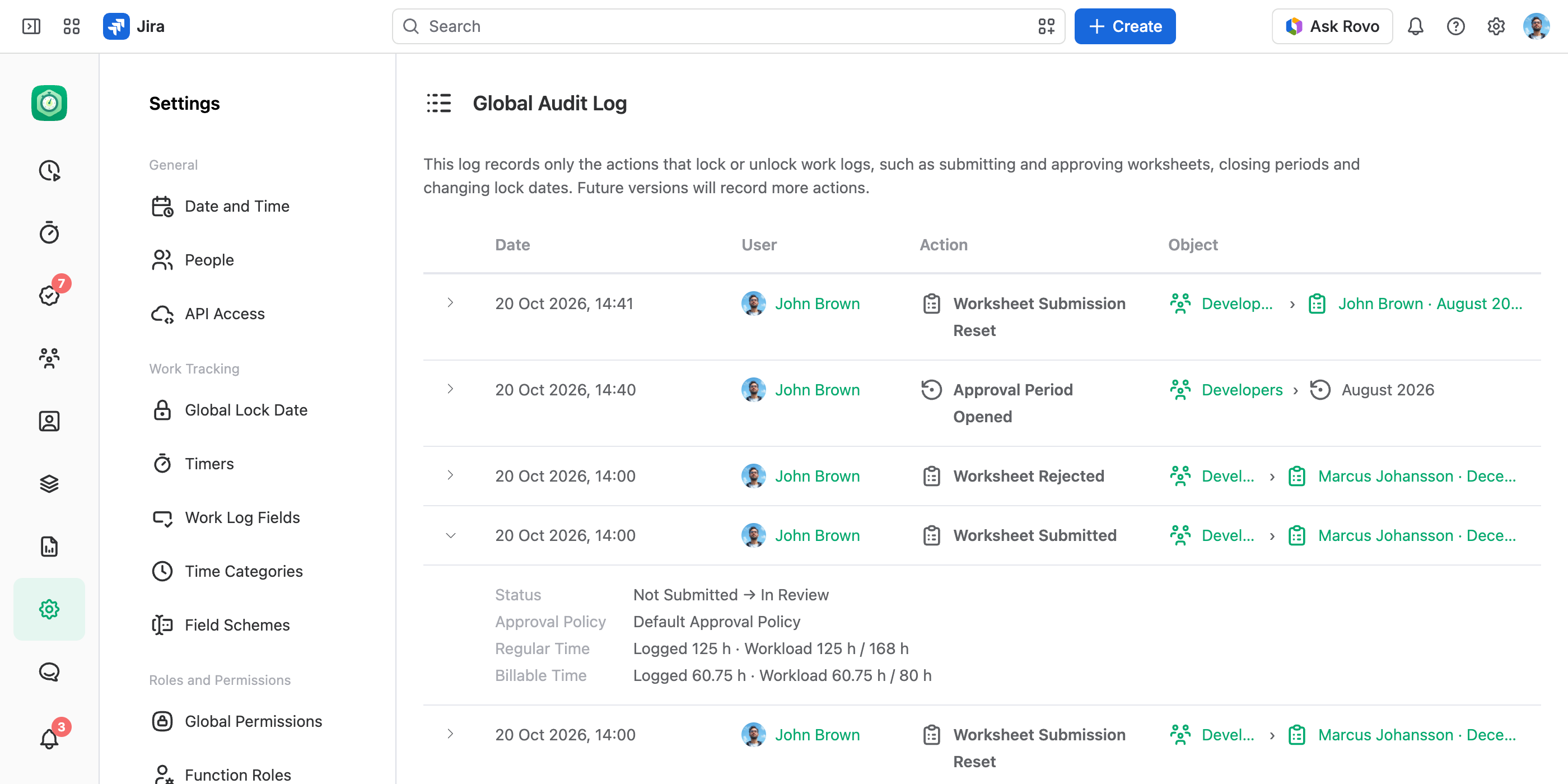
In the JetTime app, go to Settings › Global Audit Log (under Utilities). It holds the entries of every team, account and workstream, of the company-wide approvals and of the global lock date. Each one names where it happened before the object, as in Developers › Mike Davis · December 2026.
The page needs the View and Manage App Settings or the Full Access global permission.
Read an Entry
Each row shows Date, User, Action and Object: the submission or the period acted on, or whose lock date changed — a team, account or workstream, or the Global Lock Date. Expand a row for the rest: the status before and after, the approval policy and the step, the lock date before and after, the figures submitted, and the message.
Good to Know
- Entries are never changed or deleted — not by a reset, a change to an approval policy, or deleting the team. A deleted team, account or person still shows by the name the entry was written with.
- A submission's History tab shows the same record for that one submission.