
Billable Time & Custom Time Categories
Mark time as billable and organize it with custom categories.
In JetTime, you can utilize the standard Regular Time category for most of your work, but you also have the flexibility to create custom time categories, such as Billable Time, Overtime, or Travel Time, to better fit your tracking needs.
Custom time categories appear in the Log Work dialog when the Field Scheme for that work item includes them, so you can show different categories on different kinds of work:
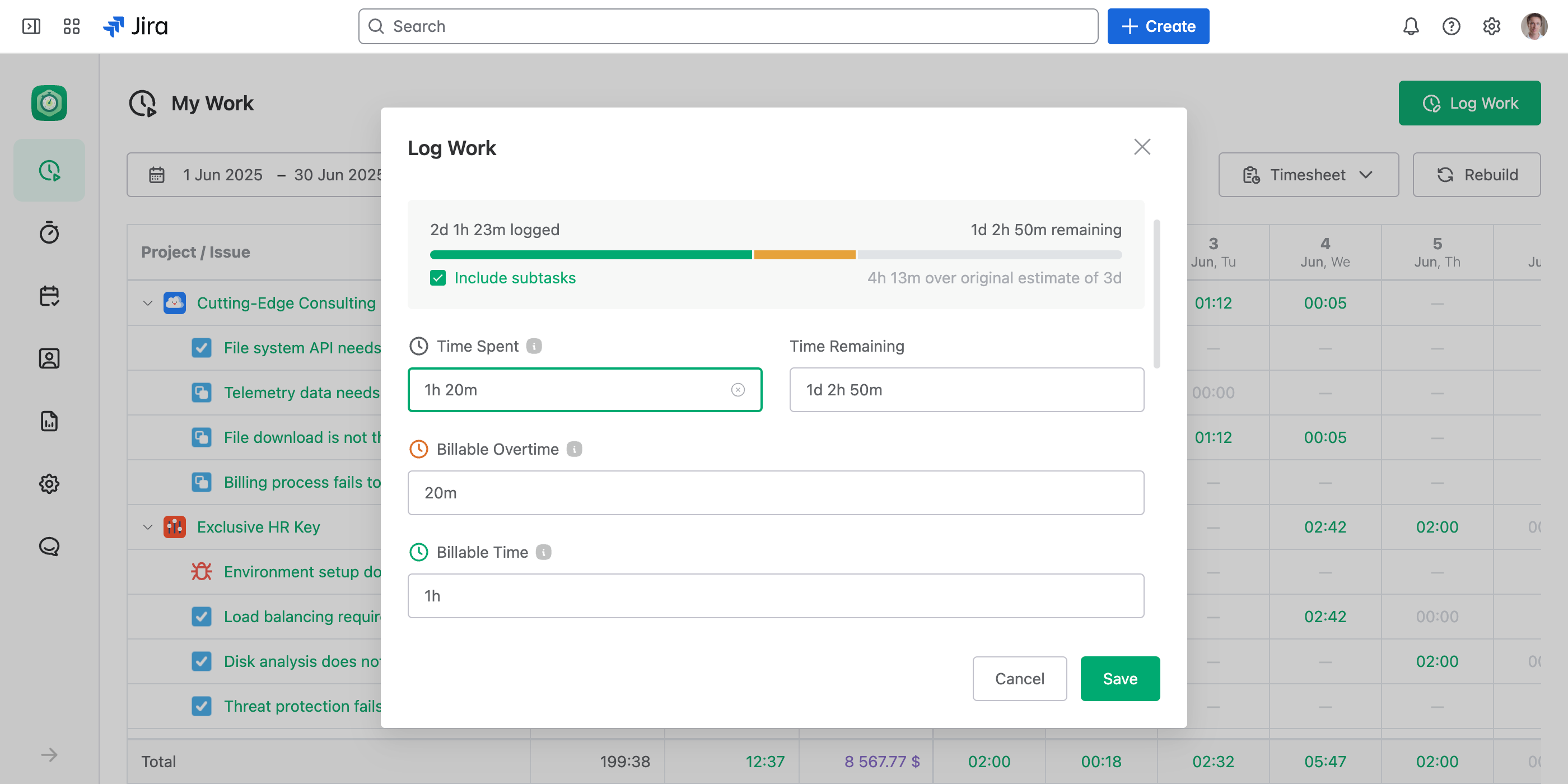
Ask people to enter 0m when a work log has none of a category's time, say no billable hours. A category left empty shows a dash in reports, so a review can tell who forgot to log it — see Find Forgotten Figures.
When to Use Custom Time Categories
If a specific type of time is common across most of your work logs, it's best to create a dedicated time category for it. This enables you to quickly select that category during the logging process, making time tracking more efficient and straightforward.
Occasional Time Tracking
For time categories that are tracked occasionally, it's recommended to keep using the standard Regular Time category. You can later differentiate that time using time filters (for example, by custom work item fields or custom work log fields) and create dedicated reports for those specific time logs.
Making Time Tracking Simple
By aligning your time categories with the frequency of your tasks, you can maintain an efficient and organized tracking process, ensuring your reports are both accurate and meaningful.